
I don’t think most of us need to worry about spies or others with malicious intent plugging malicious devices into our notebooks when we are not watching. But we do need to be aware of the threat of physical devices that might be connected to our computers, tablets, and phones.
Apple users
I don’t often recommend turning off security features, but I think most people would do well to consider turning off Apple’s default setting for accessory security. It offers very little protection for people that are not targeted by spies, but makes normal device connection difficult. I recommend setting the “Allow accessories to connect” setting to “Always Allow” so you can easily connect devices such as thumb drives, mice, and presentation remotes. Instructions can be found at the following link:
Allow USB and other accessories to connect to your Mac
https://support.apple.com/en-us/102282
This is not to say that device security is not important, but I think we need to consider the context in which we work. The following is a longer discussion on device security for everyone, not just Apple computer users.
One definition for nerd is as follows.
Nerd: a person who is extremely enthusiastic and knowledgeable about a particular subject, especially one of specialist or niche interest.
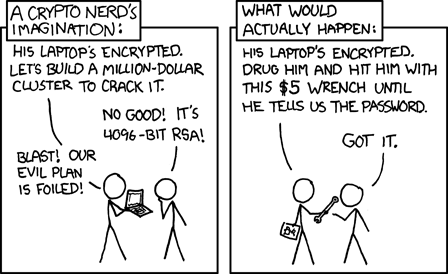
One problem that nerds can encounter is being so obsessed in their interests that they fail to consider the bigger pictures or contexts. In the case of cybersecurity, people will spend unreasonable amounts of time, money, and concern on very obscure or unlikely security scenarios, while ignoring real issues and larger contexts. I think the xkcd cartoon below illustrates this issue well. It relates to how Cybersecurity Nerds attempted to perfect disk encryption to protect systems that were in the physical possession of spy agencies like perhaps the CIA, MI5, or similar agencies in other countries. As the cartoon points out, those types of organizations are unlikely to build a next level super computer to spend years cracking the average traveler’s password, instead they will just force victims to share their passwords. The context matters.
What are some good strategies for physical system security?
First, we all need to keep an eye on our devices so they are not stolen. There is a reason data centers are kept locked.
Take care not to plug in any USB devices that you are not 100% sure of. The obvious malicious device is a USB thumb drive, but there are malicious USB cables and charging plugs for sale online, so avoid unknown cables and chargers, especially in airports. One common cybersecurity test involves labeling malicious thumb drives with a company’s logo, and a label like “Employee salaries”, “top secret”, “year end bonus”, or “naughty party pictures” and then leaving it in the parking lot to see if the person who finds it will plug it into their computer or take it to the IT team. Don’t get caught by such tricks.
Another tactic hackers use is to setup or compromise an existing charging station in a coffee shop or airport with malicious chargers, or malicious charging cables. Chips are now so small that a full malicious hacking system can be embedded in a USB cable that is not detectable without an x-ray machine. This is a threat to both cell phones & computers. Use your own cables & chargers, or if using a supplied USB power source, use a PortaPow USB data blocker (link below) to block any malicious data.
PortaPow USB Data Blocker
https://www.amazon.com/PortaPow-3rd-Data-Blocker-Pack/dp/B00T0DW3F8/
Some people compromise their security with just bad data practices. I have known a number of people who stored passwords in their phone’s contact program. That is not a safe place, but even normal data in your address book should be protected. The last rental car I used had the address books of three different previous drivers. You should not connect your phone to a rental car to sync and make phone calls unless you know how to properly clear your data out of the vehicle before you return it. (And will take the time to do so.)
Finally, don’t forget to securely wipe your old phones and computers before trading them in or disposing of them. The data on an old device can be much more valuable than the device itself.